Automation & Policies
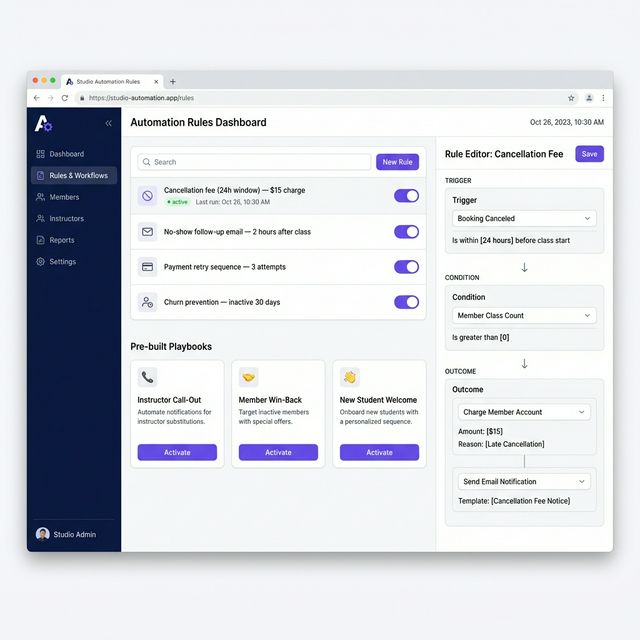
Define cancellation, no-show, and payment rules once. The system enforces them consistently.
What It Does
Key Capabilities
- Rule Engine: Trigger → Condition → Outcome logic builder
- Pre-built playbooks for common studio scenarios
- Cancellation and no-show fee enforcement
- Automated payment retry sequences
- Incident Commander for instructor call-outs
- Churn prevention flows and re-engagement triggers
Overview
Stop chasing down policy enforcement manually. Set your rules once in the Studio Sensei rule engine and the system handles cancellation fees, payment retries, student follow-ups, and staff alerts — every time, without exception.
Why It Matters
The Problem It Solves
The Problem
Policy enforcement only works if it's consistent. A cancellation policy that gets waived when you're busy or you recognize the student's name stops being a policy. Manual follow-ups on failed payments get skipped when the week gets hectic.
How Studio Sensei Helps
Studio Sensei's rule engine runs your policies without exception. Define the trigger, set the conditions, choose the outcome — then let the system handle it every time. Pre-built playbooks cover the most common studio scenarios. Build your own for edge cases specific to your studio.
Works Best With
Related Features
AI Copilot
Sensei surfaces conflicts, follow-ups, and opportunities. You review and approve before any action is taken.
Bookings & Payments
Memberships, packs, drop-ins, and intro offers. Billing handled through Stripe.
Smart Scheduling
Define class templates once. Generate recurring schedules and individual sessions from them.
See Automation & Policies in Action
Start a free trial or book a demo to see this feature working in a real studio context.