Smart Scheduling
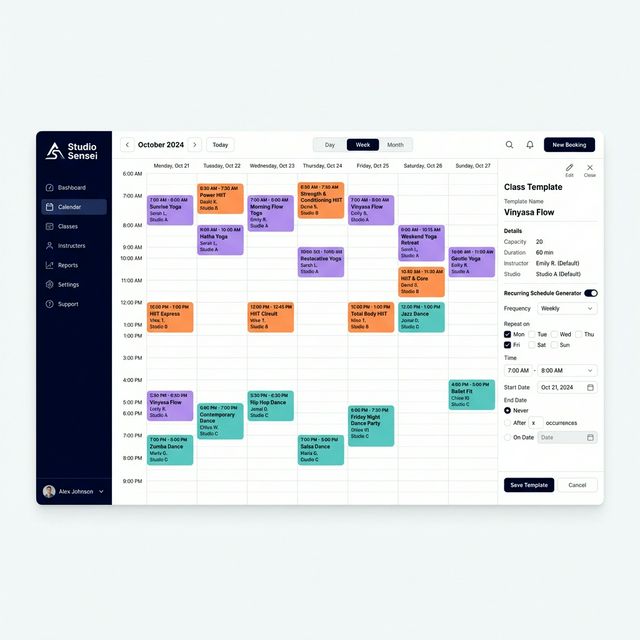
Define class templates once. Generate recurring schedules and individual sessions from them.
What It Does
Key Capabilities
- Day, Week, and Month calendar views
- Class Templates → Schedules → Sessions hierarchy
- Drag-and-drop session management
- Multi-location calendar in one view
- Conflict detection with resolution suggestions
- Asset management for class materials and recordings
Overview
Studio Sensei brings structure to your calendar without the complexity. Build class templates that define your recurring offerings, attach them to schedules, and let the system generate individual sessions — all with conflict detection and multi-location support.
Why It Matters
The Problem It Solves
The Problem
Most studios manage their calendar in Google Calendar or a spreadsheet — which means conflicts only surface when a student tries to book a class that's already full, or when an instructor shows up to an empty room because the schedule was never updated.
How Studio Sensei Helps
Studio Sensei's scheduling system builds structure on top of your calendar. Class Templates define the shape of each offering. Schedules generate recurring blocks from those templates. Sessions are the individual class instances students actually book — with override capability when a specific session needs to differ. Conflicts surface before they become problems.
Works Best With
Related Features
Bookings & Payments
Memberships, packs, drop-ins, and intro offers. Billing handled through Stripe.
AI Copilot
Sensei surfaces conflicts, follow-ups, and opportunities. You review and approve before any action is taken.
Automation & Policies
Define cancellation, no-show, and payment rules once. The system enforces them consistently.
See Smart Scheduling in Action
Start a free trial or book a demo to see this feature working in a real studio context.