Guided Setup
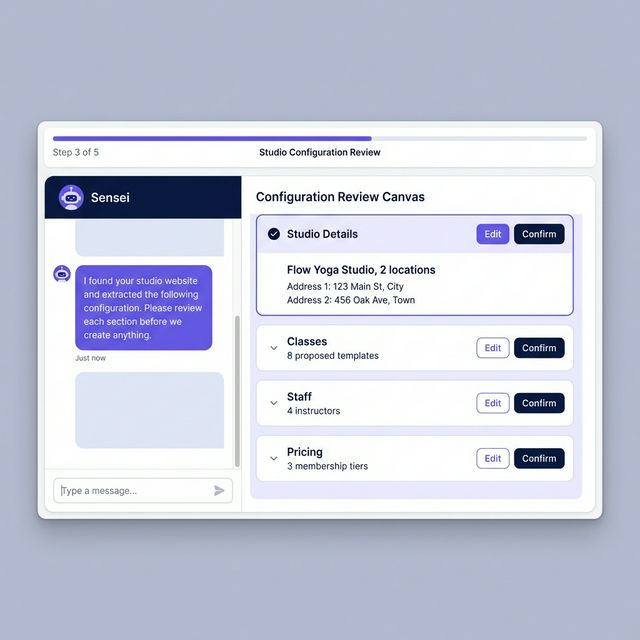
Provide your website URL or upload documents. Sensei proposes a configuration. You review and confirm.
What It Does
Key Capabilities
- 3 setup paths: website URL, file upload, or manual chat
- AI reads your content and proposes a complete studio configuration
- Review canvas shows every proposed field before it's created
- Edit any part of the proposal before confirming
- Data validation before anything goes live
- Data import assistance for studios switching platforms (Planned)
Overview
Getting started shouldn't take weeks. Share your existing studio website or upload documents about your offerings. Sensei reads them, proposes a studio configuration, and presents it for your review in a structured canvas. Nothing is created until you confirm.
Why It Matters
The Problem It Solves
The Problem
Setting up a new studio management platform from scratch typically takes days or weeks of data entry. Most studios give up halfway through and either stay with their old system or go live with incomplete data.
How Studio Sensei Helps
Studio Sensei reads your existing studio content — website, PDFs, spreadsheets — and proposes a complete configuration. You review every field in a structured canvas before anything is created. Nothing goes live until you confirm it. For studios switching from another platform, a migration assistance feature is planned to make the transfer systematic.
Works Best With
Related Features
AI Copilot
Sensei surfaces conflicts, follow-ups, and opportunities. You review and approve before any action is taken.
Smart Scheduling
Define class templates once. Generate recurring schedules and individual sessions from them.
Bookings & Payments
Memberships, packs, drop-ins, and intro offers. Billing handled through Stripe.
See Guided Setup in Action
Start a free trial or book a demo to see this feature working in a real studio context.